
Set Up IPTV Smarters Pro with Eagle IPTV: A Complete Guide
Set Up IPTV Smarters Pro with Eagle 4K IPTV in the United States: Full How-To
Are you looking for an easy way to set up IPTV Smarters Pro and enjoy the best in 4K IPTV streaming? Look no further! In this comprehensive guide, we will walk you through how to set up Eagle 4K IPTV on the IPTV Smarters Pro app in the United States. Whether you're a tech-savvy user or just starting your IPTV journey, this guide will cover everything you need to get started. With Eagle 4K IPTV and IPTV Smarters Pro, you can access live TV, movies, and series, all in stunning 4K quality. Follow along, and you'll be up and running in no time.
What is IPTV Smarters Pro?
IPTV Smarters Pro is a powerful and user-friendly IPTV app that allows you to stream live TV, movies, and series from a wide range of providers. It's a favorite for many IPTV users because of its sleek interface, ease of use, and support for a variety of IPTV sources. Whether you're watching sports, news, or the latest series, IPTV Smarters Pro offers a great viewing experience on your TV, tablet, or mobile device.
How Does Eagle 4K IPTV Work on IPTV Smarters Pro?
Eagle 4K IPTV is an outstanding IPTV service that offers a vast selection of channels, movies, and series. When paired with IPTV Smarters Pro, users can enjoy seamless streaming with a smooth setup process. There are four main options to connect Eagle IPTV with IPTV Smarters Pro: 1. Load Your Playlist or File/URL 2. Load Your Data from Device 3. Login with Xtream Codes (requires username, password, and URL) 4. Play Single Stream
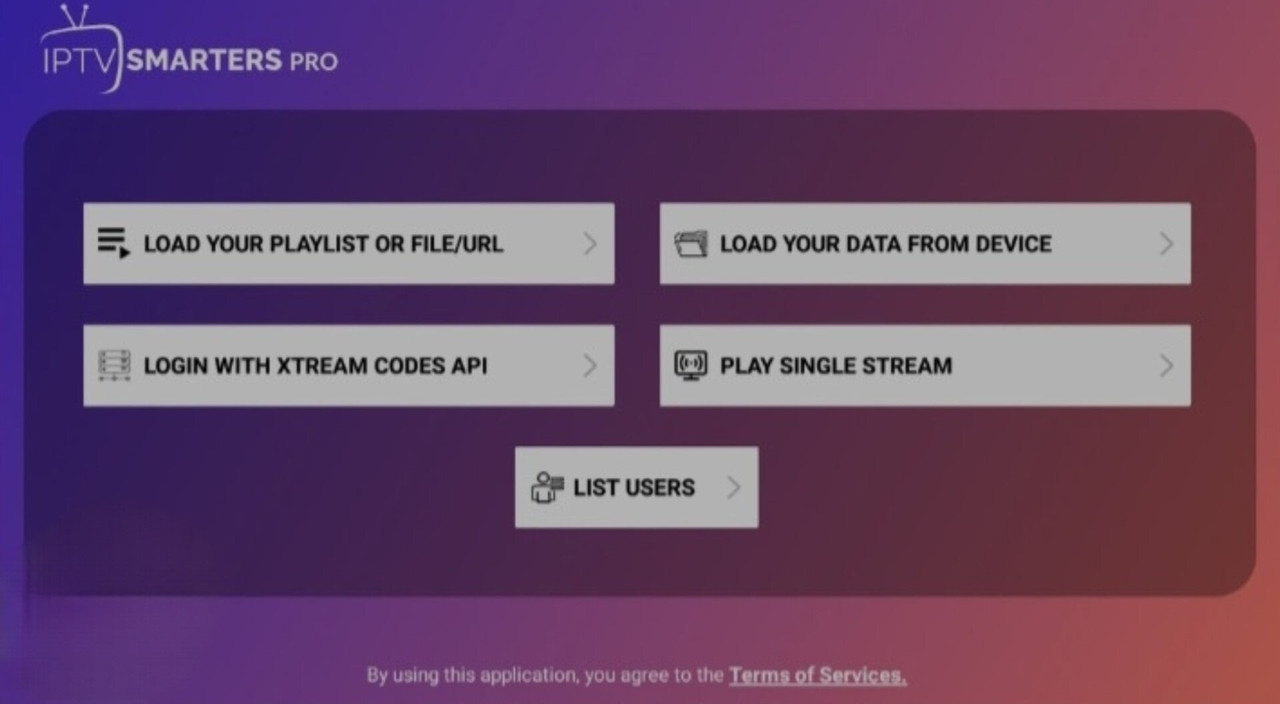
Option 1: Load Your Playlist or File/URL
This is one of the most convenient ways to set up Eagle IPTV with IPTV Smarters Pro. By simply loading a playlist or entering a URL, you can instantly start streaming content. Here’s how you can do it: Step 1: Open IPTV Smarters Pro and navigate to the "Load Playlist or File" option. Step 2: Paste your Eagle IPTV playlist URL or upload your m3u file (you can get these from your Eagle TV subscription). Step 3: Click on "Add Playlist" and wait for it to load. After this, you’ll be ready to start enjoying your favorite live TV channels and shows!
Option 3: Login with Xtream Codes
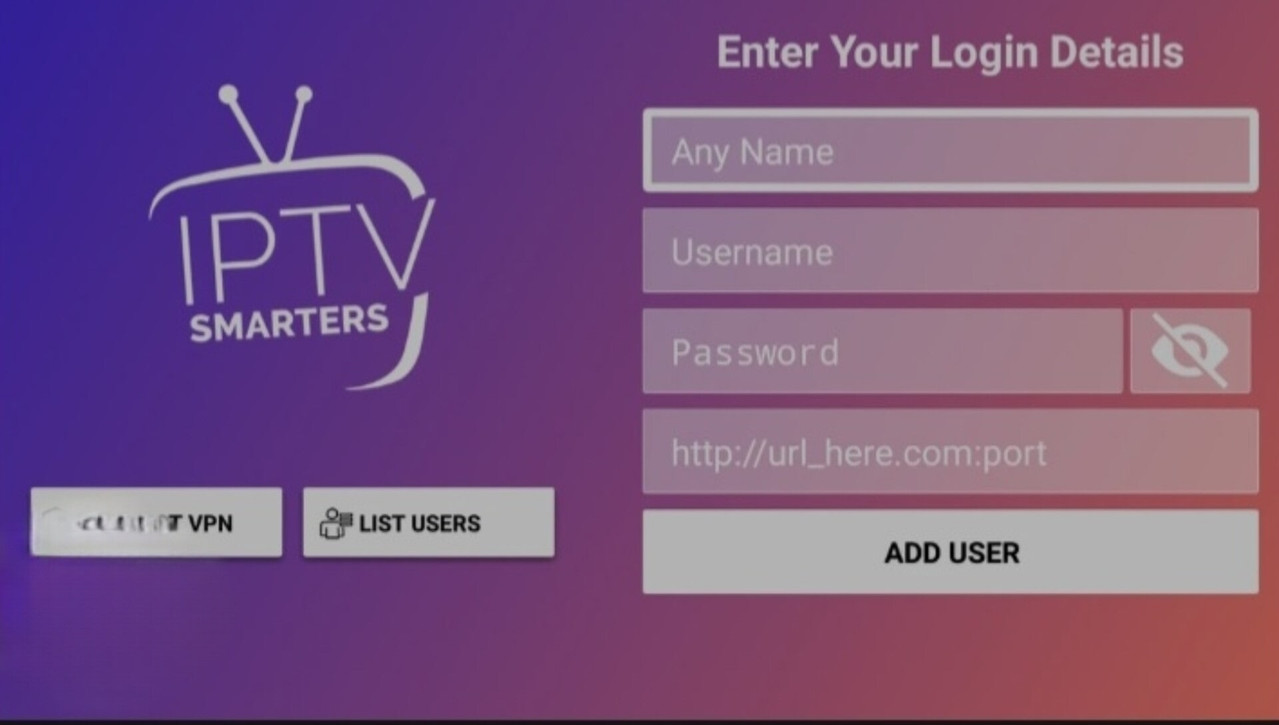
If you’ve subscribed to Eagle IPTV, the most straightforward method is to login using Xtream Codes. This requires your username, password, and URL—details provided by Eagle TV. Step 1: Open IPTV Smarters Pro and select the "Login with Xtream Codes" option. Step 2: Enter your username, password, and the Eagle IPTV URL. Step 3: Once logged in, you’ll be able to access all the features Eagle IPTV offers. This method is super convenient for users who prefer a quick and secure login process.
What You Get After Logging In with Eagle IPTV on IPTV Smarters Pro
Once you log in, you’ll have access to a variety of categories within the IPTV Smarters Pro app. The main options you will see are: Live TV Movies Series Let’s explore these options in more detail:
Live TV: 25,000+ Channels
With Eagle 4K IPTV, you'll have access to over 25,000 live channels from all around the world. Whether you're into sports, news, entertainment, or international channels, you’ll have plenty of options to choose from.
- HD and 4K Quality: Enjoy a crystal-clear picture in both HD and 4K resolution.
- Wide Range of Content: Watch live broadcasts from major networks, sports events, and more.
- Customizable: Organize your channels by categories, like sports, news, or kids’ channels, for easy access.
Movies: Top Movies from the United States
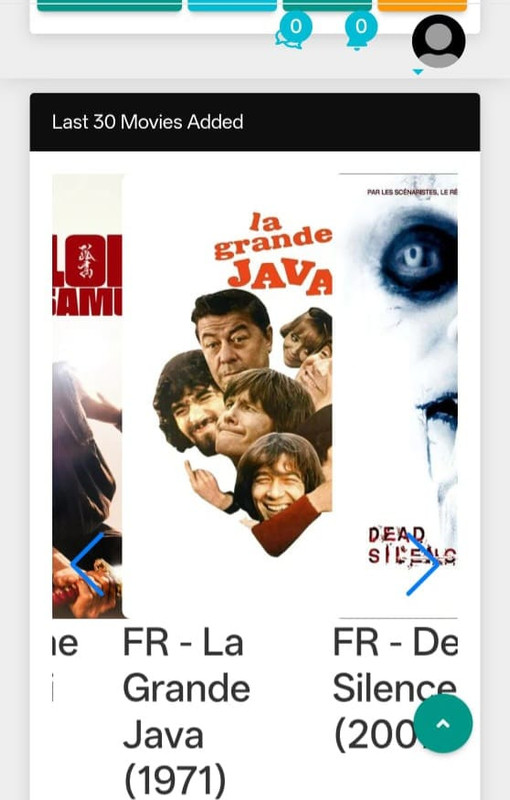
Eagle IPTV’s Movies section is a great way to enjoy the latest and greatest movies from the United States. Here’s what you can expect:
- Latest Blockbusters: Access top-rated movies from Hollywood, including new releases.
- 4K Streaming: Watch in high-definition, with support for 4K movies, ensuring a cinematic experience right from the comfort of your home.
- Variety of Genres: Whether you're a fan of action, drama, comedy, or horror, you’ll find something for everyone in the movies section.
Series: Over 100,000 Shows

If you’re a fan of binge-watching, the Series section on Eagle IPTV won’t disappoint. Here's what it offers:
- Massive Library: Access over 100,000 series and shows, including the latest seasons.
- On-Demand: Catch up on episodes you missed or dive into a new show from the start.
- Wide Range of Genres: Choose from drama, thriller, comedy, fantasy, and more. There’s something for every TV lover.
How Eagle TV Support Helps You Set Up IPTV Smarters Pro
Eagle TV’s customer support team is always ready to assist you in setting up your IPTV Smarters Pro app. Whether you're new to IPTV or a seasoned user, their team can guide you through the entire process. Once you subscribe to Eagle IPTV, you'll receive all the necessary information to configure IPTV Smarters Pro, including your username, password, and URL. Here’s what you can expect:
- Fast Setup: With detailed instructions and personalized support, you’ll get your IPTV service up and running quickly.
- 24/7 Support: Have questions or issues? Eagle TV’s customer service is available round-the-clock to ensure a smooth experience.
- Easy Troubleshooting: If anything goes wrong, their team is ready to help with troubleshooting steps and fixes.
FAQs:
How Do I Set Up IPTV Smarters Pro with Eagle IPTV?
To set up Eagle IPTV with IPTV Smarters Pro, you have four options: load your playlist/URL, load your data from the device, log in with Xtream Codes, or play a single stream. Logging in with Xtream Codes is the simplest and most convenient method, as it requires just your username, password, and URL.
Can I Watch Live TV on IPTV Smarters Pro with Eagle IPTV?
Yes! Once you log in to IPTV Smarters Pro with your Eagle IPTV credentials, you’ll have access to over 25,000 live TV channels from across the world. You can watch everything from sports to news to entertainment.
What Content Can I Access with Eagle IPTV on IPTV Smarters Pro?
You can enjoy live TV, movies, and series with Eagle IPTV on IPTV Smarters Pro. It offers over 25,000 live channels, 100,000+ series, and top Hollywood movies, all in stunning HD and 4K quality.
Conclusion:
Setting up Eagle 4K IPTV on IPTV Smarters Pro in the United States is an excellent way to enjoy a variety of live TV, movies, and series in top-notch quality. With multiple setup options and excellent customer support from Eagle TV, you’ll have no trouble getting started. Whether you want to watch the latest movies, follow your favorite series, or enjoy live TV, Eagle IPTV has it all.